The One llama.cpp Setting That Made My RTX 3090 10× Faster (Every Guide Gets It Wrong)
Real benchmarks, the q4_0 cache trick, and how I made a local LLM write code in my team’s patterns, on a single 24GB GPU.
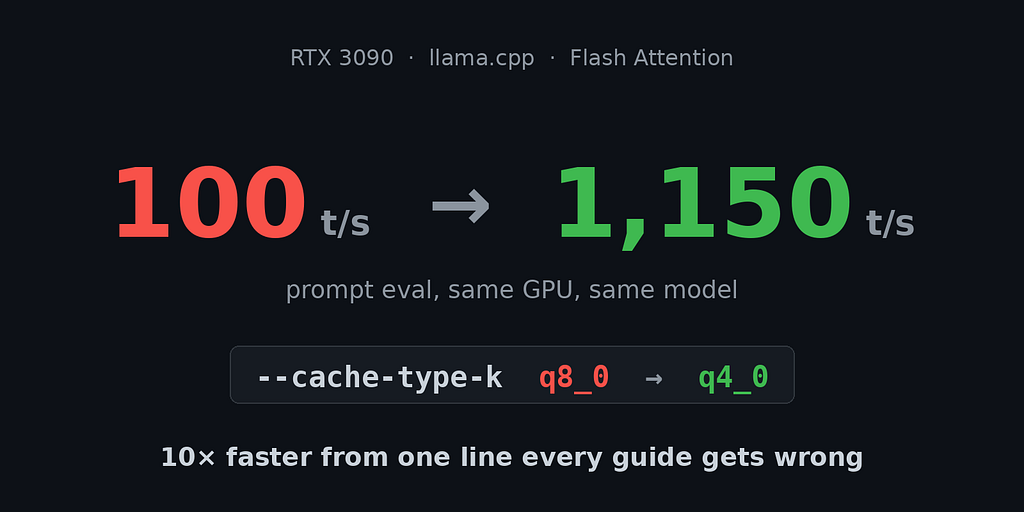
My local LLM was running at 100 tokens per second. Every guide I’d read said my setup was correct. Then I changed a single flag, the kind of detail buried in a GitHub issue with four upvotes, and prompt evaluation jumped to over 1,100 tokens per second. Same GPU, same model, same context. A 10× difference from one cache setting that nearly every tutorial gets wrong.
I’m a fullstack dev, and over the last few months I built a fully local AI coding assistant on a single RTX 3090: no API keys, no monthly bill, no sending my company’s code to someone else’s servers. It writes code in my team’s exact patterns, and it’s fast enough that I forget it’s running on my own desk.
Here’s the writeup: the real benchmarks, the mistakes that cost me hours, the one setting that changes everything on Ampere GPUs, and where local models still lose.
TL;DR
- On an RTX 3090 with Flash Attention, use
--cache-type-k q4_0, notq8_0. The q8_0 K cache forces a slow kernel path and drops prompt eval about 10×. - A dense Qwen3.6 27B is a stable daily driver. The flashy 35B MoE looped in multi-turn conversations.
- ~1,150 t/s prompt eval and ~60 t/s generation is enough to replace a cloud coding assistant for most day-to-day work.
- Speed and model size weren’t the actual bottleneck. Local models confidently invent APIs that don’t exist, and I fixed that with rules, not a bigger model.
Why local at all?
Two reasons. First, cost: cloud coding assistants are great until you’re hammering them all day and the bill (or the credit cap) reminds you they’re metered. Second, and more important for me, I work on a real production codebase and I’m not comfortable streaming my company’s source to a third-party API for every autocomplete. Running locally means the code never leaves my machine.
The catch everyone warns you about is quality and speed. “You need an H100.” “Local models are toys.” That’s outdated. On a single 24GB consumer card, with the right settings, a modern 27B model is genuinely useful, as long as you avoid a couple of traps.
The stack
Nothing exotic:
- GPU: RTX 3090, 24GB VRAM (Ampere)
- Inference: llama.cpp server
- Editor integration: the Continue extension in VS Code
- Model: Qwen3.6 27B (dense) in GGUF, Q5_K_M for quality, Q4_K_M when I need maximum context
llama.cpp serves an OpenAI-compatible endpoint, and Continue points at
http://localhost:11435/v1. That’s the whole architecture. The interesting part
is the tuning.
The setting every guide gets wrong: KV cache on Ampere
When you run a model in llama.cpp, the KV cache stores the attention keys and values for every token in context. You can quantize that cache to save VRAM, and the common advice is to use q8_0 for the K cache because it’s higher quality and barely costs anything.
On an RTX 3090 (Ampere) with Flash Attention enabled, that advice is a trap.
# What every guide told me to do:
--cache-type-k q8_0 --cache-type-v q8_0   # ~100 t/s prompt eval 💀
# What actually works on Ampere:
--cache-type-k q4_0 --cache-type-v q4_0 # ~1,150 t/s prompt eval 🚀Flash Attention has a fast kernel path on Ampere, but it only kicks in for specific cache types. A q8_0 K cache pushes Flash Attention onto a fallback path, and prompt evaluation collapses by roughly 10×. For coding work, the quality difference between q4_0 and q8_0 cache is basically imperceptible. The speed difference is the whole experience: it’s the gap between the editor feeling instant and the editor feeling frozen.
I lost hours to this. I blamed my context size, my model quant, my GPU, my drivers. The fix was four characters: q8_0 to q4_0.
If you take one thing from this post, take that line.
The model that looked better on paper and lost in practice
I really wanted the new 35B MoE (mixture-of-experts) model to be my daily driver. On benchmarks it’s stronger, and MoE models are fast for their size because only a fraction of the parameters activate per token.
In real multi-turn use, it fell apart. By the second or third message in a conversation it would start looping, repeating chunks of its previous output, drifting, never closing the thought. I tried disabling its reasoning budget and tweaking sampling. No luck. For interactive coding, where you go back and forth refining, a model that destabilizes after a couple of turns is unusable no matter how good its first answer is.
The boring dense 27B never did this. Benchmark scores measure single-shot answers, but daily work is multi-turn, and stability beats peak capability every time.
Two models, two jobs
24GB is enough to run a 27B comfortably, but you have to trade quality against context length, because the KV cache competes with the weights for VRAM. So I run two configs and switch in Continue by selecting a different port:
Mode          Quant     prompt eval   generation   VRAM       context
Quality       Q5_K_M    ~1,150 t/s    ~60 t/s      ~21.5 GB   49k
Max context   Q4_K_M    ~1,150 t/s    ~60 t/s      ~22 GB     131k
Quality mode (Q5) is my daily driver: sharper code, plenty of context for normal work. Max-context mode (Q4) is for when I need to feed it a large file or several files at once, and I’m willing to trade a little precision for 131k of room.
Both use the same non-negotiables: q4_0 cache, Flash Attention on, and MTP
speculative decoding (--spec-type draft-mtp) for the extra generation speed.
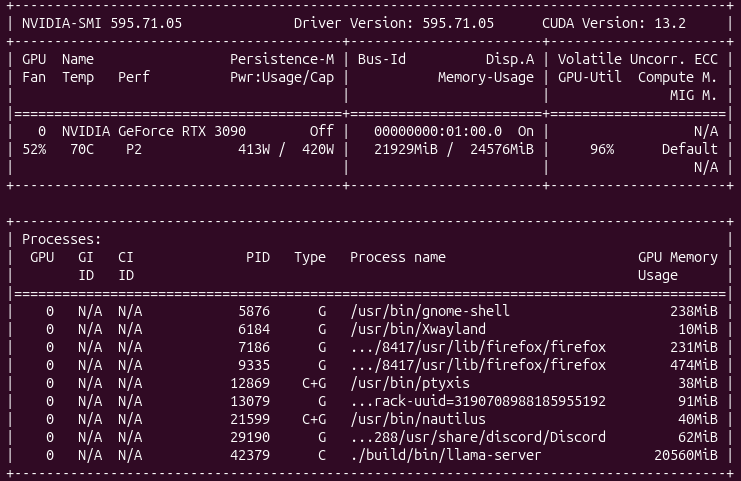
Quality mode under load: 27B Q5 on a single RTX 3090, ~21.5 GB used, GPU pinned at 96%.
Making it write code like my team
A fast model that writes generic tutorial code is still extra work, because you spend your saved time rewriting it to match your codebase. Most “run a local LLM” posts skip this part, and it’s where the real productivity is.
Continue auto-loads rules from .continue/rules/*.md. I distilled my team’s
conventions into a few scoped rule files:
- Behavior (always applied): be direct, respond in my language but write code in English, follow our commit message format, and don’t invent APIs that don’t exist.
- Frontend (scoped to Vue/SCSS files): our Design System components, CSS tokens, file/directory naming, the order of sections inside a single-file component, our Vuex patterns.
- Backend (scoped to PHP files): our bundle architecture, the Manager service pattern, where business logic lives vs. queries, authorization conventions.
With those in place, the model stopped producing correct-but-foreign code and started producing code that passes our review on the first try. The rules are versioned in the repo, so they’re shared and they evolve with the codebase.
Where local models still lose
I asked the model to add a method to a service class. It produced clean, idiomatic code in my team’s exact pattern: authorization check, fetch the entity manager, persist, flush. It looked perfect. There was one problem: it called a setter on an entity that has no such field. The code would have crashed at runtime.
The model didn’t lie. It pattern-matched. It saw the request, saw the surrounding conventions, and confidently invented an API that should exist by the logic of the patterns, but doesn’t. Local coding assistants, and honestly cloud ones too, are fluent, not grounded. They model what code looks like, not what your code is.
My fix wasn’t a bigger model. It was one behavior rule: before calling a method or field, confirm it exists, don’t invent getters, setters, or methods. It doesn’t eliminate the problem, but it cuts it down a lot, and it trained me to keep reviewing output the way I’d review a confident teammate’s PR: trust the structure, verify the specifics.
Run it yourself
This is the entire quality-mode launch script. Adjust paths and you’re running in two minutes:
#!/bin/bash
# Qwen3.6 27B Q5_K_M, daily quality driver. Port 11435.
# q4_0/q4_0 cache is mandatory: it's the fast Flash Attention path on Ampere.
cd ~/llama.cpp && ./build/bin/llama-server \
  -m ~/models/Qwen3.6-27B-Q5_K_M.gguf \
  -ngl 99 \
  -c 49152 \
  -fa on \
  --cache-type-k q4_0 \
  --cache-type-v q4_0 \
  --temp 0.6 --top-k 20 --top-p 0.95 \
  --spec-type draft-mtp \
  --n-predict -1 \
  --parallel 1 \
  --host 0.0.0.0 --port 11435
Point Continue at http://localhost:11435/v1, drop your team’s conventions
into .continue/rules/, and you have a private coding assistant that costs
nothing per token and never phones home.
What I’d tell past me
- The bottleneck was never the GPU. It was one cache flag.
- Pick the stable model, not the highest benchmark.
- Spend your first hour writing rules, not chasing a bigger model.
- I already run local AI for real dev work on a single 3090. It works today, not someday.
That’s the whole writeup. If it saves you from the q8_0 trap, it did its job.